
Installation:
Where to get it
The source code is currently hosted on GitHub at: https://github.com/calypso-science/Totoview Clone the repo:
git clone https://github.com/calypso-science/Totoview.git
Module requirements:
Toto module needs to be installed see https://totodoc.readthedocs.io/en/latest/install.htm: The source code is currently hosted on GitHub at: https://github.com/calypso-science/Toto
For windows user, if using the compiled version (.exe file)A environmental variable must be setup To set it up temporarily:
set TotoPath=C:\user\software\toto
or add TotoPath as environmental variable
Install from sources
Close the repo: .. code:: bash
Install requirements. Navigate to the base root of totoview and execute:
pip install -r requirements0.txt
Then install totoview:
python setup.py install
Installation tutorial:
Using the compiled version on WINDOWS
There are two versions of TOTOVIEW that are already compiled for Windows user. They can be found on the GitHub page (https://github.com/calypso-science/Totoview/releases):
totoview_withtoto.exe.
This version will install TOTO and TOTOVIEW. No need to install TOTO, it is included in it. However, you will need to wait for a new release to update your code. In this version it is not possible to get the extra plugins
totoview_nototo.exe.
This version will install TOTOVIEW and TOTO’s requirement. You still need to install TOTO but you can skip the requirement installation. This is easier to update TOTO’s code, just need to pull the updated code from GitHub and re-install TOTO. To do follow this steps:
Step 1: Clone
Clone the TOTO repo from github: .. code:: bash
Clone the TOTO plugins repo if you access
Step 2: Install TOTO
python setup.py install
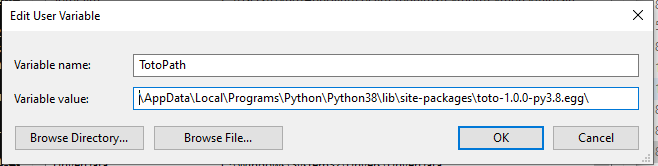
Look where is your installed path and copy it, It should look like: C:\Users\username\AppData\Local\Programs\Python\Python38\lib\site-packages\toto-1.0.0-py3.8.egg\
Step 3: Add the Environmetal variable
You must set up an Environmental variable with the folder name from where TOTO has been installed.
The variable MUST be called TotoPath.
Step 4: Add the plugins
If you have access to the plugins go the folder and do: .. code:: bash
python add_module.py